
LEASE-iQ product guide
Read the answer. Then open what it came from.
Highlights, source links, pinning and the moment LEASE-iQ tells you that the answer needs review.
Start here
When LEASE-iQ says “This needs review”, stop and read why.
LEASE-iQ runs the same question through separate reasoning passes. When those passes disagree, it flags the answer for review instead of hiding the conflict behind a confident paragraph.
Do not ignore the flag.- Read the clauses it cites. Look for overlapping definitions, exceptions or a schedule that changes the main wording.
- Check for a variation, supplemental deed or side letter that could resolve the conflict.
If the documents remain ambiguous, “the lease is unclear on this, and here is why” may be the useful answer.
The highlights
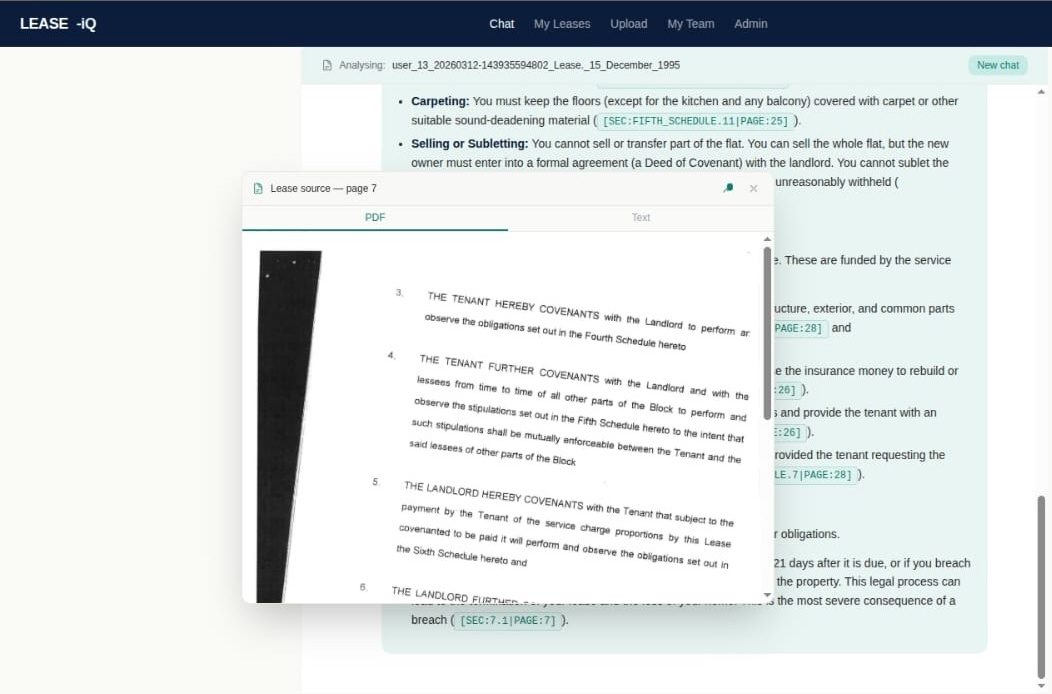
Every answer should take you back to the document it came from.
Your lease
Open the highlighted wording and read the clause around it.
An external source
Open the cited statute, regulation or building-safety source.
The source is still available
Where one passage cannot sensibly be highlighted, open the source document directly.
- 01The clause in context
The matched wording appears with the clauses around it.
- 02The signed document
The PDF opens on the page used for the answer.
- 03The current source
Statutory references can be opened and read too.
Two things that can look odd
The wording matters more than a neat screen match.
The PDF number may not line up
Leases use different numbering conventions. LEASE-iQ anchors to the wording. Use the text view to locate it, then read the signed PDF page.
The text view may show more than the highlight
Definitions, exceptions, surrounding clauses and schedules can change the meaning. The exact match is highlighted while the context stays visible.
Working with the lease in view
Pin the wording you need to compare.
Pin more than one passage to read an operative clause beside its definition, exception or schedule.
Use Pin and Close at the top right of a highlighted section to keep the working view readable.
Select the highlighted text to copy the source clause and reference into a case note or letter.
Checking LEASE-iQ
Use the one-click check, especially when the decision matters.
An answer that cannot be checked is an opinion. If you are a managing agent, housing officer or director, somebody may later need to see why the decision was made.
We would rather you verified the answer than trusted it.