
Request access

LEASE-iQ® is live

Ask the lease. See the source.

Upload the signed document and ask the question already creating work. LEASE-iQ helps you find the relevant wording and keeps the clause, page and unresolved point in view.

Choose an example below. Request access when you’re ready to use your own lease.

Describe your problem and prepare your own question →

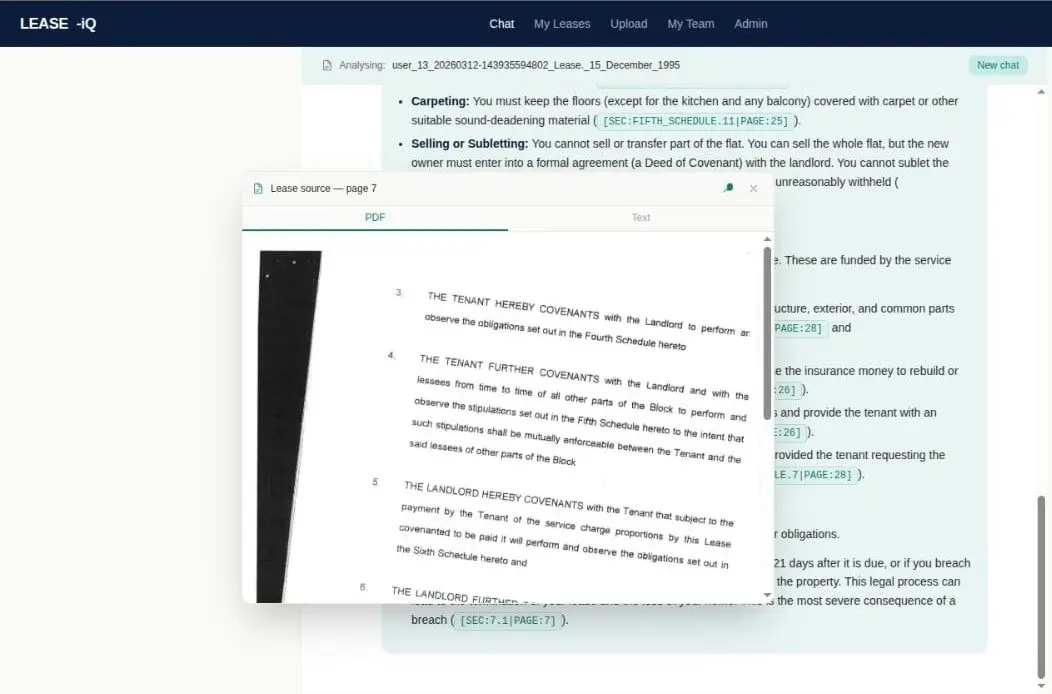
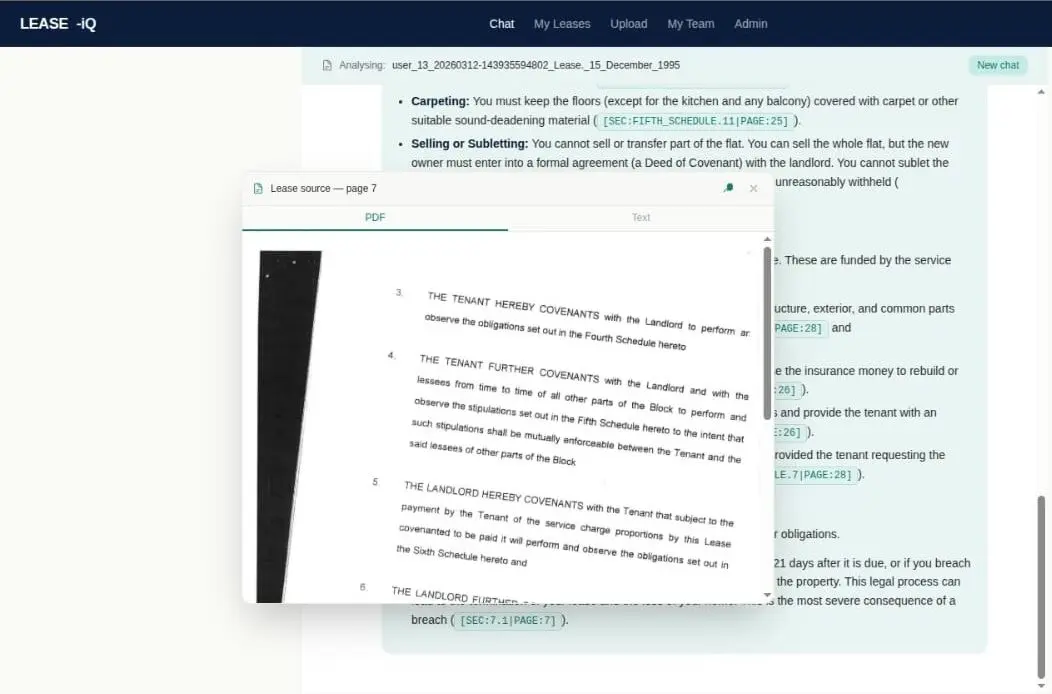
The original LEASE-iQ product screen with a cited lease page open over the answer
LEASE-iQ screenSame question. Different lease. Different answer.

See LEASE-iQ working

Your question. The evidence. A useful next step.

Choose your role and follow a real lease through a worked example. See how the answer connects the wording, how you check it, and how it helps you move the issue forward.

Check the evidence. Get the investigation moving.Adam’s voice · optional subtitles

Play the film or jump to a chapter. Subtitles start off; use CC to turn them on. Pause or use full screen to read the sources. The leaseholder film reads the legal words, then explains them in plain English.

Ready to use your own lease?

Request a free team month with up to 100 leases. We’ll reply with your access link and upload instructions.

Managing agent · 2:11 film

A leak report. Access refused.

See the actual scanned lease and relevant legislation. Check the repair and entry conditions, then prepare a calm inspection request while cause and responsibility remain unconfirmed.

What you can leave withUnderstand the entry conditions and write a calm inspection request with LEASE-iQ.
Explore the question and the next step

Start with the question

Who may enter to investigate this reported leak, for what purpose and on what conditions? Show the relevant wording and what remains unknown.

Prepare something useful

Draft a neutral inspection request. Cause and responsibility are unconfirmed. Do not invent an appointment, deadline or right of entry.

Consider how it might be received

Could the occupier reasonably ask about scope, attendees, disruption or cost? Review these as possible concerns, not predictions.

Worked example using the real scanned Hafer Road lease and a hypothetical situation. Actual product screens are distinguished from illustrative next steps.

Worked example using the real scanned Hafer Road lease and a hypothetical situation. Actual product screens are distinguished from illustrative next steps.

Download this film
Read the transcript

A leak is reported. The resident is worried, access is disputed, and the cause is unclear. LEASE-iQ helps you work through the lease, understand your next step and write a response. You can do that in the same conversation.

Start with the source. This is the actual scanned lease page, not just an extracted answer. The property description includes all Service Media exclusively serving the Property. For a pipe, the question is whether it serves only this flat. That needs evidence; the lease cannot inspect the pipe.

Here is the original repair page. Read the obligation to keep the Property in good repair and condition together with the insurance exception in the same sentence. Check the definitions and the cause of the damage. Do not transfer this answer to another flat without checking its own lease.

Keep the legislation in view too. This is section nineteen of the Landlord and Tenant Act nineteen eighty-five, opened in the source panel. If repair costs are to be recovered through a variable service charge, check reasonable spending and a reasonable standard of work, as well as the lease's charging provisions. This does not decide who caused the leak.

Next, ask about the entry conditions: who may enter, for what purpose, the notice, timing and making good any damage. LEASE-iQ connects the wording and explains it. Open the source yourself to verify it against the facts of your case.

Now ask LEASE-iQ to draft a calm inspection request. It can also read the draft from the resident’s perspective. Does it explain who is coming, what will happen in their home, and whether agreeing to an inspection means accepting a bill? Refine the wording in the same conversation, then check that it says what you intend before sending.

Trust and verify. LEASE-iQ is built around accuracy, with connected lease wording, relevant legislation and sources you can inspect. No AI or lawyer can promise a hundred per cent accuracy. For a repair bill or disputed liability, open the lease and legislation to personally validate the answer. You have the explanation and the response ready to use. If you want specialist advice on a complex dispute, LEASE-iQ can prepare the brief too.

Read the scanned pages and legislation

Open the original pages at a readable size, then compare the wording with the explanation.

This is a worked example using one lease. Personally verify the document, law and facts that matter to your decision.

Difficult scans and commercial leases

The Newsteer stills show both useful extraction and “CONFLICT – NEEDS CHECK”. See what happens when the document cannot support a firm answer.

Need help choosing your question?

This optional guide helps you put the issue into words and decide what you want to achieve.

Prepare my question →

Need help logging in or uploading? Watch the walkthrough →

Built for the way leases work

A simple question. A structured process behind the answer.

A lease can put the definition on one page, the obligation on another and the exception in a schedule. LEASE-iQ is built to connect that wording with relevant legislation, then help you understand the answer and act on it.

  1. 01

    Read the document

    Turn the PDF or scan into structured text, with the original page available to inspect.

  2. 02

    Connect the meaning

    Bring definitions, clauses, schedules and relevant legislation into the question.

  3. 03

    Challenge the answer

    The checking approach includes AI review and code that tests quoted wording against source text.

  4. 04

    Show you the evidence

    Open the lease and law, see what remains uncertain, then draft and refine your next step.

Robust checks. Practical verification. No AI or lawyer can promise 100% accuracy. Match your own checking to what is at stake: a clear pet clause may need a quick look at the conditions; a disputed bill or major works deserves a closer check.

How LEASE-iQ works, in plain English

Read Sean’s explanation of the checking approach, including how the route varies with the question.

The simple how-to · 1:13

Start with one lease and one question.

Request access, sign in, upload your PDF and choose the processed lease. Then ask, open the sources and prepare your next step.

  1. Request access, then sign in.

    We confirm your access and the secure upload route.

  2. Upload your lease PDF.

    Scanned leases are supported. Allow time for processing.

  3. Choose the document and ask.

    Open the lease wording and any cited legislation. Check the answer before using it.

Request free accessAlready have access? Sign in ↗

Edited walkthrough. Processing time is skipped. Product screens recorded in October 2026.

Read the transcript

Let me show you how to get started with LEASE-iQ. If you are new, request access through the website. Once we have confirmed your access, sign in.

Choose Upload and select the PDF of your lease. You can upload a scanned lease. Give it time to process. You can leave the page while that happens.

Once it is ready, choose the lease you want to work with. Check that you are asking about the right document.

Ask one clear question. For example, “Under this lease, who is responsible for repairing the window frame?” Read the answer and the explanation.

LEASE-iQ is built around accuracy: connected lease wording, relevant legislation, original sources and visible uncertainty. No AI or lawyer can promise a hundred per cent accuracy. Trust and verify, in proportion to the decision. A clear pet clause and its permission conditions may be enough to get on with it. For a disputed bill, major works or a significant commitment, open the original lease and legislation and check the detail yourself.

Now ask LEASE-iQ to write your letter or email. Ask how it might be received, and refine it in the same conversation. Check that it reflects your situation and what you want to say, then use it to move the issue forward.

More detail: source checks, questions, solicitor briefs and what’s next.

Trust and verify. In proportion to the decision.

LEASE-iQ is built around accuracy: connected lease wording, relevant legislation, checks on the answer and original sources you can inspect. No AI or lawyer can promise 100% accuracy.

A clear pet clause may need a quick look at the permission conditions. For money, major works or a dispute, open the lease and legislation and personally check the detail. Ask LEASE-iQ to draft and refine the response, then take the next step.

See how LEASE-iQ works → · Want specialist advice? Prepare the brief here →

The old way and the LEASE-iQ way

From searching the lease to opening the source behind the answer.

The same signed lease is easier to act on when the answer stays connected to the page behind it.

The old way tangles emails, lease PDFs, property systems and regulations between the leaseholder, adviser and one expert. The LEASE-iQ way moves a real question through the clause and law, the actual page, both sides, then a draft and outcome.
The old way and the LEASE-iQ way.
A real LEASE-iQ answer with the cited page of the signed lease open in the PDF viewer
LEASE-iQ screen. The cited lease page stays open over the answer.
Download the one-page visual

LEASE-iQ improves the first answer linked to its sources. It does not decide disputed facts or replace accountable professional judgment.

Residential and commercial leases

What LEASE-iQ helps you do.

Understand the wording, check what supports the answer and decide what would move your issue forward.

What is LEASE-iQ?

LEASE-iQ is Building Trust’s AI lease-analysis application for residential and commercial property. It helps you reason over the signed lease and relevant legislation, find the source behind an answer and identify what still needs checking. It supports leaseholders, property teams and advisers; you review the evidence before acting.

Can LEASE-iQ work with a poor scanned lease?

Yes. The Newsteer example uses a difficult commercial lease from 1963. It shows useful extraction alongside an unresolved point. A poor scan can leave wording uncertain: LEASE-iQ should say when it cannot establish an answer, and you can open the original page to personally verify the reading. Watch the Newsteer example.

Does it check the lease and legislation together?

LEASE-iQ analyses the signed lease alongside relevant legislation for the question asked. Open the cited clause, page and legislative provision, check that they support the answer and confirm why they apply to the property and issue. See the source-checking standard.

Can it help prepare a letter or a property solicitor’s brief?

After checking the answer, ask for a focused draft using the facts and sources you have confirmed. Keep missing evidence and unsent correspondence clearly labelled. Review the wording and how the recipient might read it. Complex or unresolved legal issues can be organised into a draft brief for a property solicitor to review. See the brief workflow.

How do I get started?

Prepare one question with Describe your problem. Then request access or sign in to LEASE-iQ, upload or select the correct lease and paste the question. Check the sources before asking for a follow-up draft. Watch the simple getting-started film.

For a complex issue

Ask LEASE-iQ to draft your solicitor’s brief.

Use the same conversation in which you have explored the issue. LEASE-iQ can organise your account, the outcome you want, correspondence and missing evidence into a draft for a specialist property solicitor.

One request at a time. Explore the lease, check the sources, then ask for a short draft brief. Check its facts and references before sharing it.

  1. Describe the issue, your role and the outcome you want. Say what is known, disputed or missing.
  2. Work through one lease question at a time and open the relevant sources. Confirm any checks you have actually made.
  3. First ask: “Summarise only the status of the correspondence. Distinguish what is known from what is unknown.” Then copy the short brief request below. Ask separately: “Check your draft against the facts I supplied. Which factual details or assumptions have you added that I have not confirmed?” Review the revision before sharing it.
Prepare the draft brief in LEASE-iQ
Open LEASE-iQ ↗

Check these points before sharing the draft
  • Your account is distinguished from established facts, disputed points and assumptions.
  • A draft is not described as sent. Missing correspondence or dates are marked unknown.
  • The correct lease and other documents are identified. Another flat’s terms are not assumed.
  • Every source reference is attached and checked, or its absence is made explicit.
  • The note asks a focused question for the solicitor. It does not decide the dispute.

Nothing is sent to the solicitor or LEASE-iQ by this page.

About an hour’s lease-summary work, reduced to about five minutes. In one live workflow reported by Adam, that included personal validation and formatting an existing Word template with Copilot. An individual example, rather than a guaranteed time for every task.

Coming soon for property teams

One question. Across a whole block.

We’re extending LEASE-iQ so managing agents and housing associations can upload multiple leases, organise them with tags and ask a question across a selected group.

Start with the block, scheme or group of homes you need to understand. Compare what their leases say before applying the same answer to everyone.

Take on a block with the lease differences in view.

Bring the leases together and tag them for the work ahead. Ask about repair responsibilities, service-charge provisions and consent requirements across the group.

For example “Which leases place window repairs on the leaseholder, and which use different wording?”

Check the consent process across the affected homes.

Explore whose consent is required and what conditions appear in the selected leases. Use the differences to focus the cases that need a closer check.

For example “What does each lease require before an owner changes the flooring?”

Start a repair-bill review with the relevant wording.

Ask which repair and cost-sharing provisions appear across the selected leases. Then check the works, invoices, consultation and other evidence alongside the documents.

For example “Which provisions could be relevant to recovering the cost of these roof works?”

Rental agreements and shared ownership

Support for more of the homes your team manages.

Rental agreements are coming to LEASE-iQ too, alongside expanded legislation for rental and shared-ownership questions. The aim is to help teams explore the relevant agreement and legal framework together, while keeping differences between tenures visible.

The supported agreement types and jurisdictions will be set out with the release.

More source detail: council windows, the lease and legislation

Optional source detail

Go deeper into the council works sources.

Follow a hypothetical £18,000 estimate from the answer to the lease text, original PDF and legislation. Then ask what evidence is still missing.

76 seconds · Silent, with on-screen guidance. Pause or use full screen to read the sources. The leaseholder film reads the legal words, then explains them in plain English.

A public City of London specimen with blank particulars. The walkthrough shows why a charging clause alone cannot establish your share or justify the bill.

Ask about your own lease
Actual LEASE-iQ screens captured 11 October 2026. An edited walkthrough of one checked example; processing time and pauses are removed. Read the public specimen lease (PDF).
Read the council works walkthrough and sources

This 76-second silent walkthrough shows selected views from one LEASE-iQ conversation. The original question and one follow-up produced the answers shown. The £18,000 window replacement estimate is hypothetical; the document is an unsigned public specimen, not a customer’s lease or a live dispute. Screens are cropped and enlarged for readability; answer wording is unchanged.

  1. Ask a practical question. The question asks what to check before accepting the estimate: the charging clause, the share, which work qualifies, consultation including dispensation, and reasonable costs. It explicitly identifies the specimen and asks the app not to fill in blanks or assume the works qualify.
  2. Separate the clause from the amount. The answer identifies an obligation to contribute to specified repairs. It also identifies a blank contribution percentage and says the signed lease and responsibility for the proposed work must be checked. In the specimen, clause 4(3)(a) is on PDF page 18 (printed page 12); the definitions are on PDF pages 21–23 (printed pages 15–17). Window glass is addressed on PDF page 29 (printed page 23), subject to the lease’s exceptions.
  3. Open the lease text. Clicking the underlined “a reasonable part” reference opens the extracted source with surrounding context. The percentage is blank. The source includes provisos, so the short definition should not be read in isolation.
  4. Check the original PDF. The PDF tab opens the actual document. The view is positioned at the same blank percentage on PDF page 22 (printed page 16), rather than relying on the answer or extracted text alone.
  5. Open the consultation legislation. The answer’s reference opens Section 20 of the Landlord and Tenant Act 1985, including its qualification about tribunal dispensation. The relevant procedure depends on the works and procurement arrangements. See the Leasehold Advisory Service’s consultation guide.
  6. Check the cost and standard of work. Another reference opens Section 19. The displayed source covers reasonably incurred costs, a reasonable standard of work, and reasonable advance payments with subsequent adjustment.
  7. Ask for the missing evidence. The follow-up asks whether the specimen proves the £18,000 share. The answer says it cannot, then suggests three questions: What percentage is in the signed lease? How does the total cost and that percentage produce £18,000? Assuming qualifying works, has consultation been completed or has the tribunal granted dispensation?
  8. Read the dispensation power. The follow-up’s reference opens Section 20ZA, so the viewer can check the tribunal’s power in the legislation itself.

What this does not establish: The specimen does not determine whether the proposed replacement is chargeable, the correct percentage for any home, or whether £18,000 is payable. Its “specified repairs” definition distinguishes ordinary repairs from structural defects, with particular conditions and alternatives for the latter. The signed lease, later deeds, nature of the work, notices, accounts and applicable law still need checking.

Source: City of London’s published specimen lease. The council has not endorsed this demonstration. LEASE-iQ provides information, not legal or surveying advice. Outputs can contain errors; check the full sources and seek appropriate professional advice before acting.

Professional boundary

Do the groundwork. Know when judgment is needed.

LEASE-iQ helps organise the documents, sources, reasoning and next question. It does not decide disputed facts, inspect a building or turn incomplete sources into certainty. Later deeds may change the answer. Deeds of variation are not yet applied automatically, so supply and check any later documents that affect the question.

The easiest useful first step

One free lease, or a free team month.

Leaseholders and buyers can use one residential lease free, with no month limit. Professional and building teams can request a free month with up to 100 leases and the questions arising in their normal work.

Request accessNo card and no automatic conversion. Access begins only after the manual request is confirmed.
01Request access first

Do not send the lease until building trust confirms the secure upload route. Team users and month dates are agreed before the free month starts.

02Ask the real question

Start with the issue causing time, cost or conflict.

03Open and verify

Check the clause and source behind the answer.